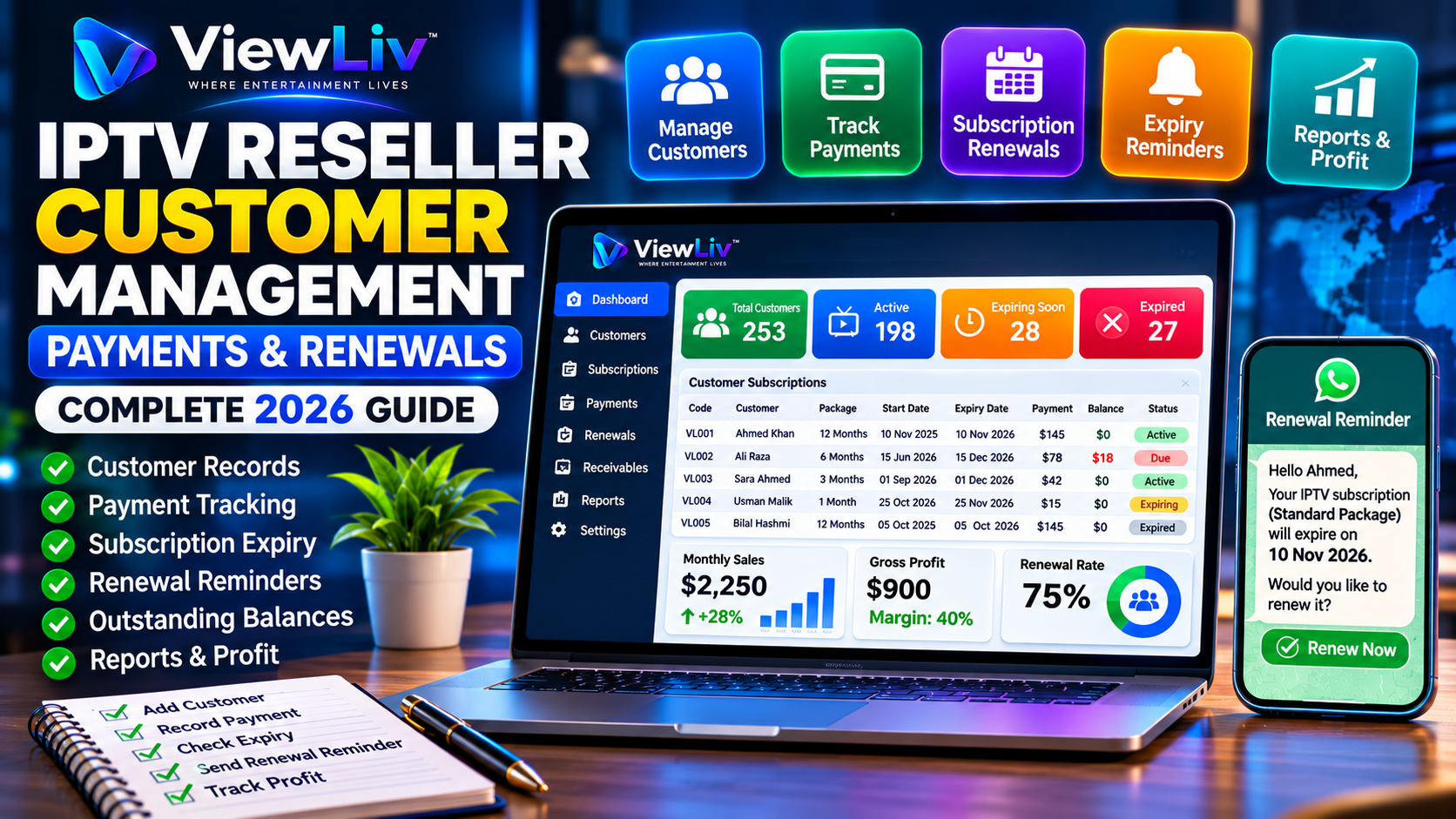
Managing an IPTV reseller business involves much more than activating subscriptions. As your customer base grows, you need reliable systems for recording customer information, tracking payments, monitoring subscription expiry dates, and handling renewals.
Without organized records, even a small reseller business can experience missed renewals, incorrect customer balances, duplicate accounts, and inaccurate profit calculations.
In this 2026 guide, we'll explain how to manage IPTV reseller customers, payments, and subscription renewals efficiently, whether you're starting with a few customers or managing a larger subscription business.
This guide applies to businesses reselling properly authorized streaming services. Before offering subscriptions, verify that your provider has the necessary distribution rights and that your reseller agreement permits the intended sales.
Why IPTV Reseller Customer Management Matters
Customer management is the foundation of an organized subscription business.
A reseller may need to answer questions such as:
- Which customers have active subscriptions?
- Which subscriptions will expire soon?
- Who has already paid?
- Which customers still owe money?
- What package did each customer purchase?
- How much did each subscription cost?
- Which supplier provided the service?
- When did the customer last renew?
Without structured records, answering these questions becomes difficult.
A proper customer management system helps improve accuracy, customer support, financial visibility, and renewal planning.
Step 1: Create a Customer Registration System
Every customer should have a consistent record.
Recommended Customer Information
| Field | Purpose | | -------------------- | --------------------------------- | | Customer code | Unique identifier | | Customer name | Identify the customer when needed | | Phone or email | Customer communication | | Subscription package | Record the purchased service | | Supplier | Identify the authorized provider | | Activation date | Record subscription start | | Expiry date | Track subscription end | | Selling price | Record customer charges | | Supplier cost | Calculate direct costs | | Payment received | Track collected funds | | Outstanding balance | Monitor unpaid amounts | | Renewal status | Track continuation decisions |
Collect only the information necessary for legitimate business purposes and protect it according to applicable privacy requirements.
Why Use Unique Customer Codes?
Two customers can have the same name.
For example:
- Customer code: VL001.
- Customer code: VL002.
Unique codes help distinguish records and reduce errors when recording payments, sales, or renewals.
They also make it easier to locate a customer's transaction history.
Step 2: Organize Customer Subscription Details
Each subscription should be associated with the correct customer.
Useful subscription information includes:
- Subscription package.
- Subscription duration.
- Activation date.
- Expiry date.
- Authorized supplier.
- Account status.
- Selling price.
- Supplier cost.
- Renewal history.
Example Customer Subscription Record
| Field | Example | | ------------------- | --------------- | | Customer code | VL001 | | Package | Standard | | Duration | 3 months | | Activation date | 1 November 2026 | | Expiry date | 1 February 2027 | | Selling price | $42 | | Supplier cost | $25 | | Amount received | $30 | | Outstanding balance | $12 |
The figures are hypothetical.
The actual expiry date should follow the provider's activation and renewal rules, including its treatment of time zones and calendar months.
Step 3: Understand Active, Expiring, and Expired Subscriptions
Subscription status is essential for renewal management.
Active Subscriptions
An active subscription is within its valid service period and has not otherwise been suspended or terminated.
Expiring Soon
An expiring subscription is approaching its scheduled end date.
For example, a business may choose to review subscriptions expiring within the next three days.
Expired Subscriptions
An expired subscription has reached its end date without an applicable extension.
Not Renewed
Some businesses maintain a separate status for customers who have decided not to continue.
This helps distinguish intentional nonrenewal from subscriptions awaiting a customer response.
Step 4: Track Customer Payments Accurately
A subscription sale and a customer payment are different transactions.
A reseller may activate a subscription before receiving the full selling price.
Example
Suppose:
- Subscription selling price: $20.
- Supplier cost: $12.
- Customer pays initially: $15.
The records should show:
Sale: $20
Supplier cost: $12
Payment received: $15
Customer balance: $5
The gross profit on the sale is $8, before other expenses, but $5 remains unpaid.
Why This Distinction Matters
If you record only the amount received, you may understate sales.
If you record the full sale as cash collected, you may overstate available cash.
Accurate accounting should distinguish revenue, direct costs, cash receipts, and receivables according to the applicable accounting method.
Step 5: Maintain a Customer Payment Ledger
A customer ledger records transactions associated with an individual customer.
Example Customer Ledger
| Date | Transaction | Charge | Payment | Balance | | ---------- | --------------------- | -----: | ------: | ------: | | 1 Nov 2026 | Subscription sale | $20 | — | $20 | | 1 Nov 2026 | Initial payment | — | $15 | $5 | | 5 Nov 2026 | Remaining payment | — | $5 | $0 | | 1 Dec 2026 | New subscription sale | $20 | — | $20 |
A ledger helps you review historical charges and payments without relying on message conversations or memory.
Benefits of Customer Ledgers
- Identify outstanding balances.
- Review previous purchases.
- Verify payment history.
- Resolve billing disputes.
- Support accurate financial reporting.
- Improve customer communication.
Step 6: Manage Subscription Expiry Dates
Subscription expiry tracking is particularly important for recurring-revenue businesses.
Each subscription should have an accurate start and end date.
Common Subscription Durations
Authorized providers may offer:
- One month.
- Three months.
- Six months.
- Twelve months.
The reseller should record the actual expiry date confirmed by the provider.
Do not assume that every provider calculates expiry dates in exactly the same way.
Why Expiry Dates Get Recorded Incorrectly
Common causes include:
- Incorrect activation date.
- Wrong package duration.
- Time-zone differences.
- Manual entry mistakes.
- Early renewal rules.
- Bonus subscription periods.
- Provider-side adjustments.
Always verify the confirmed account expiry after activation or renewal.
Step 7: Create a Subscription Renewal Schedule
Renewal reminders help customers understand when their service is approaching expiry.
A simple reminder schedule might be:
| Time | Action | | -------------------- | -------------------------------- | | 3 days before expiry | Initial renewal reminder | | 1 day before expiry | Optional follow-up | | On expiry | Expiry notification | | After expiry | Follow up only where appropriate |
The exact schedule should reflect customer preferences, communication consent, and applicable messaging rules.
Example Renewal Reminder
Hello,
Your [Package Name] subscription is scheduled to expire on [Expiry Date].
If you would like to continue your service, please contact us to arrange renewal.
Thank you for choosing our service.
Personalize the Message
Useful information may include:
- Customer name, when appropriate.
- Subscription package.
- Expiry date.
- Renewal instructions.
- Business name.
Avoid exposing unnecessary account information in messages.
Step 8: Manage Early Subscription Renewals
Some customers renew before their existing subscription expires.
The correct handling depends on the provider.
Example
A customer has five days remaining and purchases another one-month subscription.
Some providers may extend the existing expiry date by the new subscription duration.
Others may start a new period immediately.
Before processing an early renewal:
- Check the current expiry date.
- Confirm the provider's renewal policy.
- Verify the package.
- Confirm the renewal charge.
- Process the renewal.
- Record the provider-confirmed new expiry date.
Never promise that unused days will carry forward unless the provider supports it.
Step 9: Handle Customers Who Do Not Renew
Not every customer will continue their subscription.
A customer may stop because of:
- Budget changes.
- Reduced interest.
- Service dissatisfaction.
- Device compatibility.
- A move to another authorized provider.
- Temporary personal circumstances.
Recommended Nonrenewal Process
Record the customer's decision, where appropriate, and update the subscription status.
Avoid repeatedly sending reminders to customers who have opted out.
Maintaining accurate nonrenewal records helps keep renewal lists relevant.
Step 10: Manage Multiple Subscriptions for One Customer
A customer may purchase more than one subscription.
For example, a customer may have separate authorized subscriptions for different households or devices, subject to the provider's terms.
Recommended Structure
Use one customer record with separate subscription entries.
Each entry should have its own:
- Package.
- Activation date.
- Expiry date.
- Supplier.
- Cost.
- Selling price.
- Payment status.
This prevents one subscription's renewal date from being confused with another.
Step 11: Maintain Supplier and Vendor Records
Customer management should be connected to supplier accounting.
A reseller may purchase subscriptions or credits from one or more authorized providers.
Supplier Records Should Include
- Supplier name.
- Contact information.
- Wholesale prices.
- Purchases.
- Credits or subscription inventory.
- Payments made.
- Outstanding payables.
- Refund adjustments.
Why Supplier Records Matter
Suppose you purchase $500 in subscription inventory but pay the supplier only $300 initially.
Your records should show:
- Purchase value: $500.
- Payment made: $300.
- Supplier payable: $200.
Supplier payables are different from customer receivables.
Tracking both helps you understand the business's financial position.
Step 12: Calculate Profit by Customer or Subscription
Knowing how much a customer paid is not enough to calculate profit.
You also need the direct cost of providing the subscription.
Example
| Item | Amount | | -------------------------- | -----: | | Subscription selling price | $30 | | Direct supplier cost | $18 | | Gross profit | $12 | | Gross margin | 40% |
Gross Profit = Selling Price − Direct Supplier Cost
Gross Margin = Gross Profit ÷ Selling Price × 100
Other expenses must be considered when calculating net profit.
Why Customer-Level Profit Tracking Helps
It can reveal:
- Packages with low margins.
- Unexpected supplier cost increases.
- Excessive discounting.
- High customer support costs.
- Unprofitable promotions.
Avoid making pricing decisions based solely on the number of subscriptions sold.
Step 13: Monitor Important Reseller Business Metrics
A reseller dashboard should help answer operational and financial questions.
Recommended Metrics
Active subscriptions: How many subscriptions are currently valid?
Expiring soon: How many will expire within the selected period?
Expired subscriptions: How many have reached their end dates?
Monthly sales: How much revenue was generated?
Gross profit: What remains after direct subscription costs?
Customer receivables: How much do customers owe?
Supplier payables: How much does the business owe suppliers?
Renewal rate: What percentage of eligible subscriptions renewed?
Example Monthly Dashboard
| Metric | Hypothetical value | | -------------------- | -----------------: | | Active subscriptions | 150 | | Expiring in 7 days | 18 | | Expired, not renewed | 12 | | Monthly sales | $2,250 | | Gross profit | $900 | | Customer receivables | $120 | | Supplier payables | $200 |
These are illustrative figures, not actual ViewLiv business data.
Step 14: Use Software to Reduce Manual Work
Spreadsheets may work for a small customer base, but manual administration becomes more difficult as the number of subscriptions grows.
Suitable business management software can help with:
- Customer registration.
- Unique customer codes.
- Sales and purchases.
- Customer payments.
- Vendor payments.
- Subscription expiry dates.
- Renewal tracking.
- Financial ledgers.
- Business reports.
- Data backup.
ViewLiv Inventory Software
ViewLiv Inventory Software is designed to help businesses manage inventory, customers, vendors, payments, and subscription-related records.
Its features include:
- Customer and vendor management.
- Sales and purchase entries.
- Customer receivables.
- Vendor payables.
- Subscription duration and expiry tracking.
- Upcoming expiry monitoring.
- Customer and vendor ledgers.
- Financial reports and Excel exports.
- Backup and data management tools.
For reseller businesses, these features can help organize administrative and financial records alongside an authorized provider's reseller panel.
ViewLiv Inventory Software is a business management tool. It does not itself provide television content, grant distribution rights, or replace a streaming provider's account activation platform.
Visit ViewLiv to learn more.
Step 15: Protect Customer Data
Customer records may contain personal and financial information.
Protecting that information is essential.
Recommended Practices
- Collect only necessary information.
- Use strong passwords.
- Limit access to authorized users.
- Enable multifactor authentication where supported.
- Maintain secure backups.
- Keep software updated.
- Avoid sharing sensitive credentials.
- Use secure communication channels.
- Delete information when it is no longer needed, subject to legal retention requirements.
If you use cloud-based systems, review their security controls and privacy terms.
Step 16: Improve Customer Support
Good customer management also includes consistent support.
Customers may contact you about:
- Login issues.
- Device setup.
- Account activation.
- Subscription expiry.
- Renewal charges.
- Payment confirmation.
- Service interruptions.
Create a Support Checklist
For each request:
- Identify the correct customer.
- Confirm the relevant subscription.
- Review account status.
- Check the reported problem.
- Follow the provider's troubleshooting procedures.
- Escalate unresolved technical issues.
- Record the outcome when appropriate.
Do not promise instant resolution for problems outside your control.
Step 17: Measure Subscription Renewal Rates
Renewal rate is a useful performance metric for subscription businesses.
Formula
Renewal Rate = Renewed Subscriptions ÷ Eligible Subscriptions × 100
Suppose 100 subscriptions were eligible for renewal during a particular month.
If 75 were renewed:
75 ÷ 100 × 100 = 75%
The renewal rate is 75%.
Use consistent definitions when comparing renewal rates across months.
Ways to Improve Renewal Management
- Maintain accurate expiry dates.
- Send appropriate reminders.
- Explain renewal prices clearly.
- Resolve customer problems promptly.
- Provide reliable support.
- Keep payment records accurate.
- Respect communication preferences.
Step 18: Avoid Common Customer Management Mistakes
Mistake 1: Recording Customers Without Unique Codes
Duplicate names can create confusion.
Mistake 2: Mixing Sales and Payments
A sale is not necessarily fully collected.
Mistake 3: Forgetting Subscription Expiry Dates
Missed expiry dates can create renewal problems.
Mistake 4: Recording Incorrect Renewal Dates
Provider-specific renewal rules must be checked.
Mistake 5: Ignoring Outstanding Customer Balances
Unpaid amounts affect cash flow.
Mistake 6: Mixing Supplier and Customer Accounts
Supplier payables and customer receivables should be tracked separately.
Mistake 7: Failing to Record Partial Payments
Every payment should be associated with the correct customer and transaction.
Mistake 8: Sending Unwanted Renewal Messages
Respect opt-outs and applicable messaging requirements.
Mistake 9: Depending Entirely on a Reseller Panel
Some panels do not provide complete accounting or customer payment records.
Mistake 10: Not Backing Up Business Records
Data loss can interrupt business operations and make financial reconciliation difficult.
IPTV Reseller Customer Management Checklist
Use this checklist to organize your operations:
- [ ] Register each customer with a unique code.
- [ ] Record the authorized subscription package.
- [ ] Confirm the activation date.
- [ ] Verify the expiry date.
- [ ] Record the supplier.
- [ ] Track the selling price.
- [ ] Record the direct subscription cost.
- [ ] Track payments received.
- [ ] Monitor outstanding balances.
- [ ] Maintain customer ledgers.
- [ ] Review upcoming expirations.
- [ ] Send appropriate renewal reminders.
- [ ] Record completed renewals.
- [ ] Update nonrenewal statuses.
- [ ] Reconcile supplier purchases.
- [ ] Review profitability.
- [ ] Back up important records.
Frequently Asked Questions
How do IPTV resellers manage customers?
They maintain customer records, subscription details, payment histories, expiry dates, and renewal information using a reseller panel, spreadsheets, or business management software.
What customer details should an IPTV reseller record?
Useful information includes a unique customer code, necessary contact details, package, activation date, expiry date, supplier, selling price, and payment status.
How do I track IPTV subscription expiry dates?
Record the provider-confirmed expiry date for each subscription and regularly review accounts approaching expiration.
When should I send subscription renewal reminders?
A business may choose reminders a few days before expiry, provided the customer has agreed to receive them and the messaging method complies with applicable rules.
How do I manage customers who have not paid in full?
Record the full sale and each payment separately, then track the remaining outstanding balance.
What is a customer ledger?
A customer ledger is a record of charges, payments, adjustments, and balances associated with a particular customer.
Can one customer have multiple subscriptions?
Yes, where the provider's terms permit it. Each subscription should have its own dates and financial records.
How do I handle early renewals?
Check the provider's renewal policy, process the authorized extension, and record the confirmed new expiry date.
How do I track customers who do not renew?
Maintain an appropriate status for expired or discontinued subscriptions and respect the customer's communication preferences.
What is the difference between customer receivables and supplier payables?
Customer receivables are amounts customers owe the business. Supplier payables are amounts the business owes its suppliers.
Can I manage IPTV customers in Excel?
Yes. Spreadsheets can be useful for small operations, although they may require more manual work as the business grows.
What software can help manage IPTV reseller customers?
Suitable customer, inventory, accounting, or subscription management software can help track records, payments, and expiry dates.
Can ViewLiv Inventory Software manage subscription records?
It includes subscription-related recordkeeping and expiry tracking features, along with customer, vendor, transaction, and ledger management.
Does inventory software replace an IPTV reseller panel?
Not necessarily. A reseller panel typically manages service accounts, while inventory software manages business records.
How do I calculate customer renewal rate?
Divide the number of renewed subscriptions by the number eligible for renewal during the same defined period, then multiply by 100.
How can I improve customer retention?
Provide accurate information, responsive support, transparent billing, appropriate renewal reminders, and reliable customer service.
Final Thoughts
Managing IPTV reseller customers, payments, and subscription renewals requires accurate records and consistent processes.
A reseller should know which customers are active, which subscriptions are approaching expiry, how much each customer has paid, and what remains outstanding.
Customer ledgers, supplier records, expiry monitoring, and financial reporting can help reduce administrative mistakes and improve business visibility.
As your operation grows, suitable business management software can help organize these activities alongside the authorized streaming provider's reseller panel.
For more information, explore these related guides:
- How to Start an IPTV Reseller Business in 2026
- IPTV Reseller Panel Explained
- IPTV Reseller Credits Explained
- IPTV Reseller Pricing Strategy
Visit the ViewLiv Blog for more articles about IPTV reseller education, inventory management, subscription management, and business software.
ViewLiv — Where Entertainment Lives.
Disclaimer: This article is educational and does not constitute legal, financial, accounting, or tax advice. Numerical examples are hypothetical. IPTV services must be distributed with the necessary content rights and resale authorization.